
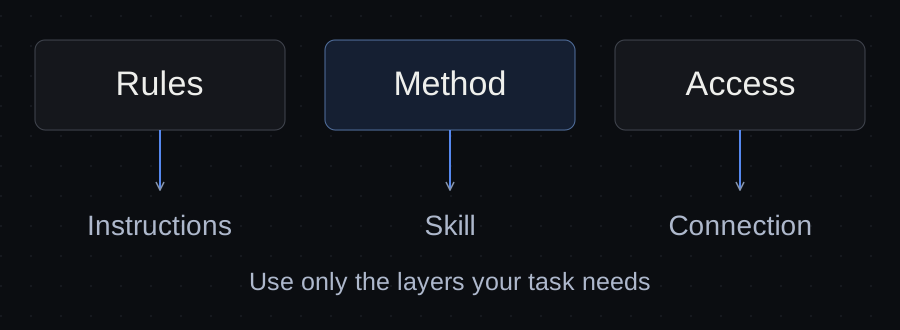
Use project instructions for rules that should apply whenever an agent works on the project. Use a skill for a repeatable task with a defined method and output. Use MCP when a compatible connection is needed to reach a tool or data source.
Before adding any of them, check what your agent can already do. A clear request and the right files may be enough.
This guide helps you choose the smallest useful setup for client work: a proposal, a website review or a report. It includes a decision table, worked examples and a worksheet you can take into your own project.
Start with the problem you can observe
“Make the agent better” is too broad to guide a useful change. Describe what goes wrong:
- It forgets that every proposal must use the client's terminology.
- It checks the copy differently each time and misses the same omissions.
- It cannot retrieve the current issue from the client's repository.
- It uses an old draft because nobody identified the approved version.
These are different problems. The first calls for a standing rule, the second for a repeatable method, the third for access and the fourth for a clearer project record.
Adding a collection of tools to all four can leave the original problem unresolved.
A practical decision table
| What you need | Start with | What to verify |
|---|---|---|
| A rule that applies throughout this project | Project instructions | The agent loads the right instructions and applies the rule |
| A one-off task using files the agent can already read | A clear request and those files | The input and expected result are explicit |
| The same review, report or preparation task repeatedly | A reusable checklist; a skill when it is worth packaging | It produces the required output on a representative example |
| Current information from an external service | An existing authorized connector, API tool or MCP server | It can read the exact source through the intended account |
| A repeatable task that also needs external information | A method or skill plus the required connection | Access and the procedure work separately, then together |
| The latest approved draft and the next action | A project record or handoff | It points to the right version and distinguishes approval from a draft |
MCP is one way to provide a connection. You do not need to replace a working connector or API tool just to use the protocol.
Project instructions define the standing rules
Think of project instructions as the short orientation you would give every new person working on a client account.
For a fictional website project called Northline, that orientation might say:
Use the terminology in the approved brand notes. Save proposal drafts in the outputs folder. Identify unresolved scope questions instead of filling them in. Prepare drafts for review; sending a proposal is a separate action.
These rules apply across several tasks. They belong somewhere the agent is configured to read for the project, rather than being buried in yesterday's conversation.
Codex documents project guidance through AGENTS.md. Claude Code documents its project instruction and memory mechanisms, including how it handles CLAUDE.md and AGENTS.md. Read the guidance for the tool you use before choosing file names and locations. Codex project instructions, Claude Code project memory.
Keep the current draft, pending decision and next action in the project's working record. Those change more often than standing rules. Our guide to organizing client AI work explains how to connect those records.
Instructions guide behavior. A sentence such as “only read this client's folder” does not, by itself, configure file permissions.
Skills package a repeatable way of doing a task
A skill gives the agent a method it can use when a particular task comes up. In the Agent Skills format, a skill has a SKILL.md file and can include references, templates and executable scripts. It is more than a catchy prompt name. Agent Skills specification.
For Northline, a useful repeatable method might be review a website proposal:
- Read the approved brief and the named proposal version.
- Compare the promised pages and features with the brief.
- Identify unsupported claims and unanswered questions.
- Separate issues that block approval from optional improvements.
- Return a review with the relevant passages and a next action.
This is a worked procedure, not an installed skill. Try the checklist on an actual draft first. If you use it repeatedly and it helps, packaging it as a skill can make the procedure easier to reuse.
Claude Code and Codex document ways to discover and invoke skills. Their behavior and supported extensions are host-specific; a shared file format does not establish that every community package works unchanged in both. Claude Code skills, Codex skills.
A skill also does not create an account or grant access to a client system. It may use tools or scripts already available to the agent, including code that calls an API. That does not mean every skill requires MCP.
MCP provides a connection to tools and data
MCP stands for Model Context Protocol. It is a standard through which a compatible AI application can work with external tools and sources. MCP introduction.
Suppose the proposal needs a fact from a current GitHub issue that is not among the agent's accessible files. The missing piece is access to that issue. Project instructions can tell the agent to use the approved issue as a source, and a review skill can tell it how to check the claim. Neither supplies the connection on its own.
GitHub publishes an official MCP server for repository-related operations. Whether it is the right connection for your task depends on your agent, account and configured access. If an existing authorized tool already reads the issue, use that instead.
Start with a specific question: “Can this connection read issue 42 in the intended repository?” A list of available tools is weaker evidence than retrieving the right source.
A successful read does not establish that writing, sending or publishing is configured appropriately. Evaluate only the operations your workflow needs.
Three worked examples for the same client
Northline and the file names below are fictional. These examples demonstrate a decision process, not results from a live integration test.
The agent keeps promising a custom booking system
The approved scope is a link to the client's existing booking service. The agent keeps adding a custom booking feature to proposal drafts.
Choice: make the approved scope easy to find and state the standing instruction to check it before making feature promises.
Check: ask the agent to review a draft containing a custom-booking promise. It should identify the conflict and point to the governing scope.
A new external connection would not solve this if the approved scope is already available.
Proposal reviews keep missing the same omissions
The agent can read the brief and draft, but its reviews skip missing pages or unsupported claims.
Choice: use a repeatable review checklist. Consider a skill when you want to reuse that method.
Check: use a draft with a missing Contact page and an unsupported guarantee. The review should identify both and explain why they matter. Also give it a correct passage and check that it does not invent an issue.
The deliverable review guide and downloadable checklist provide a starting point.
A weekly status note needs current repository information
The status note needs an up-to-date issue state that the agent cannot currently read.
Choice: provide the missing connection through a suitable existing tool or MCP server. Add a repeatable reporting method only if you need one.
Check: retrieve the named issue, preserve its source reference and distinguish its state from your interpretation. If access fails, the report should say which information is missing rather than fill in a plausible update.
For a one-off report, an authorized export may be sufficient. For recurring work, assess the connection's setup and upkeep.
Try the smallest change before adding a package
Choose one representative task and keep its input fixed.
- Write down the output you need and what is going wrong.
- Check which files, accounts and tools the agent can already reach.
- Make one change: clearer instructions, a review method or access to one source.
- Run the same task and compare the result against the brief.
- Keep the change if it solves the observed problem without unnecessary setup.
Include a case that should fail: a missing source, an out-of-scope promise or an incomplete brief. A useful workflow should expose that problem.
One successful example is a starting point. Repeat the check on another representative input before relying on it for client work.
Use the decision worksheet
Copy these fields into your project, or download the worksheet with filled examples:
Task and output: What should the agent produce?
Observed problem: What is missing or wrong today?
Available input and tools: What can it already read or do?
Standing rule: What should apply across this project?
Repeatable method: Which steps are worth reusing?
Missing access: Which exact source or operation is unavailable?
Smallest change: What will you add, if anything?
Check: Which expected result and failure case will show whether it helps?
Leave a field blank when that layer is unnecessary. A one-off copy review may need only a clear request, the brief and the draft.
If the real difficulty is returning tomorrow, use a project handoff to identify the current output and next step. Adding another skill is not a substitute for knowing which work to continue.
Common questions
Can a skill and MCP work together?
Yes. A skill can describe a reporting or review method that uses tools exposed through MCP. Check the connection first, the method second, and the complete workflow last.
Do I need MCP to let an agent read local files?
Check your agent's existing file access first. If it already reads the authorized project files, you may not need another file tool.
Should every instruction become a skill?
Use project instructions for standing project guidance and a skill for a task-specific procedure worth reusing. A temporary request can remain a request.
Will adding more extensions make the agent more capable?
Only if they address a real need and work in your environment. Select one missing capability or method, verify it, and expand from there.
Sources and verification
Primary documentation linked in this guide was read on October 10, 2026. Provider instructions describe documented behavior; the illustrated client workflow has not been tested with a live agent. Check current account rules before relying on them.
Templates, without the signup.
Fill these from the actual files and decisions. A written boundary does not enforce access control.