
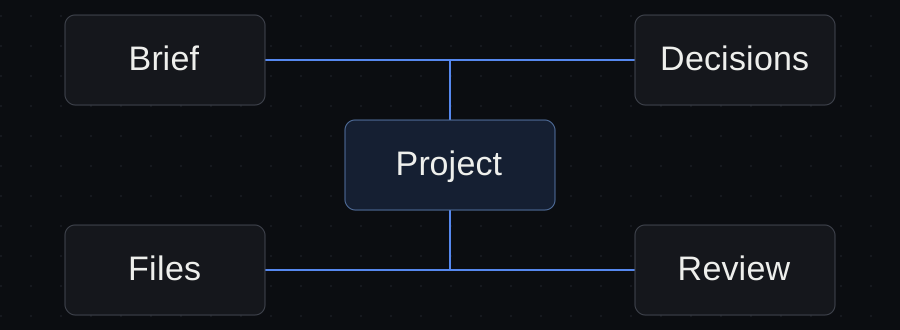
You found the right client conversation. Now you need to find the approved brief, work out which draft is current and remember whether the client accepted the change discussed yesterday.
A folder per client is a start, but it does not answer those questions on its own.
For each deliverable, keep a clear relationship between the source material, the work in progress, the decisions and the accepted result. Conversations can support that relationship. They should not be the only place it exists.
Give each document a job
A small project can have four kinds of material:
| Material | Its job | Example |
|---|---|---|
| Brief | Define the result and constraints | Approved page list and intended audience |
| Working draft | Hold the current proposed output | A website proposal awaiting review |
| Decision record | Explain approved changes and unresolved choices | Booking link approved; custom booking excluded |
| Accepted result | Identify what has passed the agreed review | The proposal the owner has approved to send |
These can live in folders, a document workspace or another system you already use. The requirement is that a person can identify their roles and that an agent is directed to the correct material.
Do not build a complicated taxonomy before completing a task. Start with the distinctions that prevent confusion in your current work.
Keep proposed facts separate from supplied facts
AI-generated work often introduces something that sounds plausible: a service benefit, a delivery date, a price or a claim about the customer.
In client work, plausible is not the same as supplied or approved.
Use a brief that distinguishes:
- Information the client provided.
- Decisions the project owner approved.
- Assumptions waiting for confirmation.
- Statements the agent must not invent.
For a website proposal, that last category might include prices, delivery promises and services outside the approved list. The agent can suggest a question or flag a missing fact without turning it into a commitment.
Follow one deliverable through the project
Northline is a fictional client commissioning a five-page website proposal. The approved pages are Home, About, Services, Service detail and Contact.
The first draft suggests an embedded booking system. The project owner decides to use a link to Northline’s existing booking service instead.
To keep the work coherent, make the decision authoritative in the decision record, then update the brief and task record with references to it:
- The brief states that the existing booking link is in scope and a custom booking flow is excluded.
- The decision record captures the approved choice and its effect on the proposal.
- The task record points to the draft that still needs checking for old booking promises.
You do not need to rewrite the entire project history. You need to make the current decision and its unfinished consequence visible.
If the agent only sees the early conversation, it may repeat the old suggestion. If it only sees “booking approved,” it may infer the wrong version. A useful record says what was approved.
Make the current output easy to identify
File names such as final, final-new and final-really-final shift the burden of version control back to your memory.
Choose a simple convention that fits your tools, then keep one explicit reference to the current output. For example:
Current proposal:
proposal-draft-v2.md.Status: ready for owner review; not approved for client delivery.
Remaining check: Contact wording matches the existing booking-link decision.
The path is illustrative. The important information is which result is current and what its state means. Version history helps explain changes; a current-output reference tells you what to open now.
Do not equate “latest” with “approved.” A recent draft can replace an older file without improving it or passing review.
Close the feedback loop
Client feedback can arrive in an email, meeting or separate review document. If it affects the next agent task, turn it into a clear instruction with a source and status.
Weak instruction:
Make the proposal more like what the client wanted.
Useful instruction:
The client approved linking to the existing booking service. Check the Contact section for any promise to build a booking flow. Flag conflicting wording and prepare a revision for owner review.
The useful version names the decision, the affected output and the next review. It also avoids giving the agent a broad invitation to invent the client’s preferences.
Separate reusable methods from client material
A proposal checklist can be reusable. Northline’s brief is client material. Cedar’s unapproved campaign offer is different client material.
Keep reusable methods free of details that belong to a particular engagement. When a client example improves a method, use a permitted, anonymized example or a clearly fictional one.
For an active task, provide only the source material needed for that client and deliverable. A note saying “do not mix clients” is helpful guidance, but the environment must also have the access boundaries required by the work. Claude Code documents permission controls separately from project instructions. Claude Code permissions.
Do not assume that two labelled folders or separate conversations provide complete isolation. Check what the tool can actually read and change.
Decide what should stay in project instructions
Stable working conventions belong in the place your tool uses for project instructions. A transient question belongs in the current task or handoff.
“Do not invent commercial terms” can be a recurring rule. “Check the Contact section against the approved booking link” is a current action.
Separating those roles makes it easier to keep instructions small and task notes current. It also reduces the chance that an old action remains in a permanent instruction file after the project moves on.
A quick check before delivery
Ask these questions about the result you intend to send:
- Which brief and decisions does it follow?
- Where is the current file?
- What was checked, and what still needs judgment?
- Who approved this version for the next step?
- Does it contain another client’s information or an unsupported commitment?
If you cannot answer one of them, make that gap visible before delivery. More generated material is unlikely to fix an unclear approval state.
An organized project lets you trace a result back to the right inputs and decisions. That is what makes the next conversation, revision and client handoff easier to trust.
Sources and verification
Primary documentation linked in this guide was read on October 10, 2026. Provider instructions describe documented behavior; the illustrated client workflow has not been tested with a live agent. Check current account rules before relying on them.
Templates, without the signup.
Fill these from the actual files and decisions. A written boundary does not enforce access control.